Getting started - A simple "Hello" example

Description:

Build a small 'hello world' console application:

Function:

The .NET client calls a function provided by a Java server (The function has the signature 'string hello(string)') and displays the result.

Goal:

Write a Java RMI Server, create IDL from Java, generate C# code from IDL and write a .NET client application.

Source:

\DemoJava\Hello

Example

Step 1. Write the Java Server

a.) Remote interface (Hello\Greetings.java):

  ...
  public interface Greetings extends Remote  
  {
    String hello( String name) throws RemoteException;  
  }

b.) Implementation to the interface (Hello\GreetingsImpl.java):

  ... 
  public class GreetingsImpl extends PortableRemoteObject implements Greetings
  {  
 
  ...
    public String hello( String name ) throws RemoteException 
    {
      System.out.println("Greeting from" + name);
      return "Greetings to " + name;
    }
  }

c.) The Java main (Server.java):

Create a instance of the remote object:

  GreetingsImpl oGreetingsImpl = new GreetingsImpl();  

Connect the name service:

  Context initialNamingContext = new InitialContext();  

Publish the reference with the name service. Use the 'HelloJavaServer' as the name by which the object is published:

  initialNamingContext.rebind("HelloJavaServer", oGreetingsImpl);  

d.) Compile the Java project:

    > mkdir classes
    > javac -classpath . -d classes Server.java
    > rmic -iiop -classpath .\classes -d classes Hello.GreetingsImpl  
    > cd classes
    > jar cvf ..\Server.jar .
    > cd ..

Step 2. Generate the .NET Proxies

a.) Launch Brewer, the J-Integra® Espresso Proxy Generator

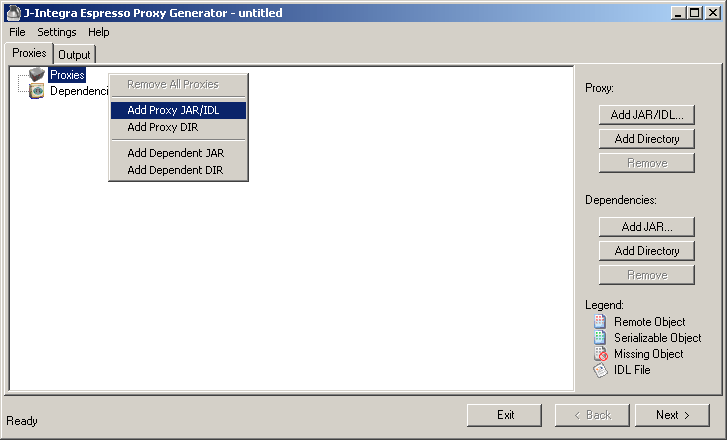
b.) In the Proxy Tab , right click Add JAR/IDL or click the Add JAR/IDL Button and then browse to the Server.jar:


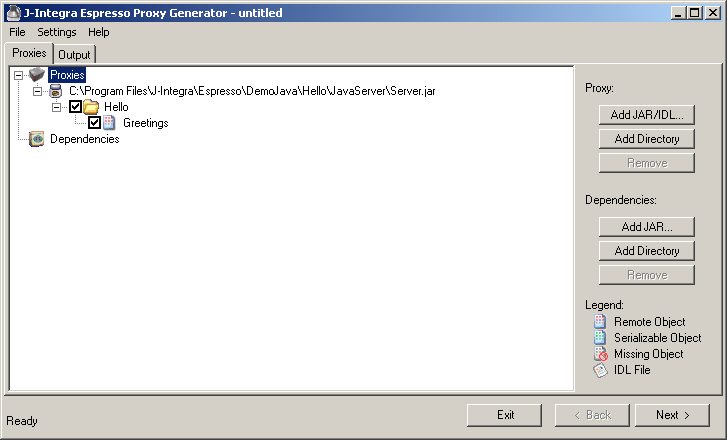
c.) Expand the JAR Icon, if it is not already, and check Greetings class:


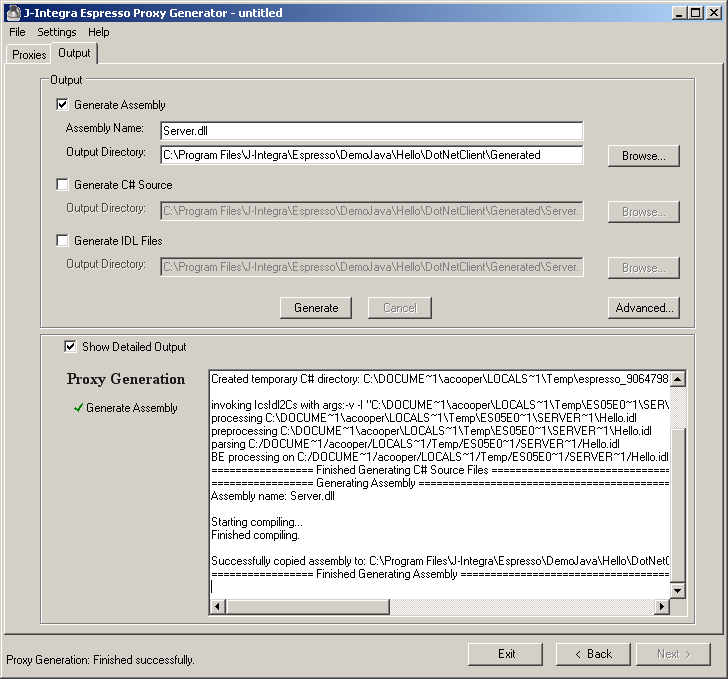
d.) Click the Output tab. Enter server into the assembly name field, select the Generated directory for the Output Directory field, and then click Generate:


Step 3. Write the .NET Client

a.) Create a console application.

b.) Add a reference to '$ESPRESSO_INSTALL_DIR$\bin\Jintegra.Espresso.dll'.

c.) Add a reference to Generated\server.dll

d.) The Client (main.cs):

Initialize J2eeQuickConfig using Java RMI/IIOP as the Application Server type,
and turn on error log option in J2eeQuickConfig for the client (refer User Guide for more J2eeQuickConfig options).

  J2eeQuickConfig qc = new J2eeQuickConfig(ApplicationServer.SUN_JDK_RMI_IIOP);

  // Default Java version 1.4.2. Options are JDK_131, JDK_141, JDK_142 and JDK_150  
  // qc.SetTargetJavaVersion(JavaVersion.JDK_150);
     
  // Turn on log with name Log.txt and without appending exist log file
  qc.SetApplicationLog(OrbErrorLevel.ERRORS, "CltLog.txt", false);

Then we initialize J2eeEasyContext and use it to get an object reference to the remote object.
It is assumed that the remote object is known as 'HelloJavaServer' in the name service:

    J2eeEasyContext.Init(qc);
    
    // get the server object reference 
    Hello.Greetings oGreetings = (Hello.Greetings)J2eeEasyContext.Lookup("HelloJavaServer", "Hello.Greetings");  

Make a call to the remote object:

    string strRet = oGreetings.hello("Ics");  
    System.Console.WriteLine("{0}", strRet);

Step 4. Run the example

a.) Start the sun name service on port 10050:

    > start orbd -ORBInitialPort 10050  

(could also use startNameService.bat located in the DemoJava directory to quick start the name service)

b.) Start the java server by using JNDI CosNaming and work with a name service running on 'localhost' at port '10050':

    > start java -cp .;Server.jar -Djava.naming.factory.initial=com.sun.jndi.cosnaming.CNCtxFactory -Djava.naming.provider.url=iiop://localhost:10050 Server  

(could also use buildServer.bat and startServer.bat located in the JavaServer directory to quick build and run the Java Server)

c.) Start the .NET Client.